

Embedding Setup
How embedding works
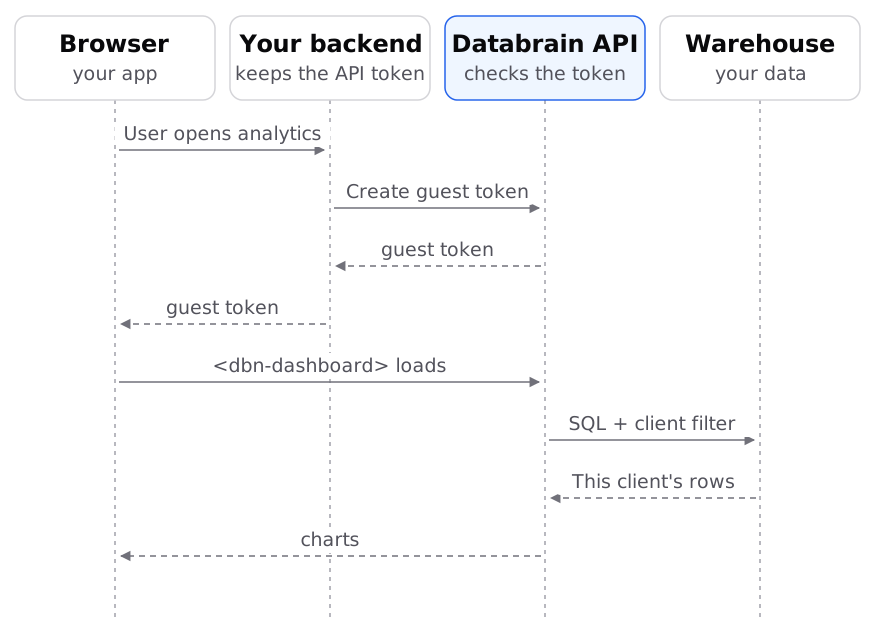
Which part runs where, which credential goes where, and how Databrain keeps each customer's rows apart.
Your backend trades a secret API token for a short-lived guest token. The browser shows the embed with the guest token only.
The parts
| Part | Where it lives | What it does |
|---|---|---|
| Data app | Databrain, Data Studio > Data Apps | Holds the embeds, API tokens, allowed domains and theme for one product. |
| Embed | A row in the data app’s Embeds tab | One dashboard or one metric the data app can show. |
| API token | Your backend secrets | Creates guest tokens for one data app. Never send it to a browser. |
| Guest token | The browser, on the element’s token attribute | Lets one session show the embeds, as one customer. It expires. |
<dbn-dashboard>, <dbn-metric> | Your page, from @databrainhq/plugin | Web components that draw the dashboard or metric. |
How rows stay apart
- Your backend sends
clientId, the customer company, when it creates the guest token. - Databrain saves the token with that client, the data app and the
paramsyou sent. The browser cannot change them. - For each card, Databrain adds the client filter that matches your tenancy level. For Table it filters on the client column. For Database and Multi-database it uses that customer’s schema or database. Tenancy levels
- App filters, row-level settings and table filters from the token are added on top. Multi-tenant access control
Where the embed is allowed to load
The embed loads only on domains in the data app’s Domains list. On any other site it shows UNAUTHORIZED_ORIGIN. The list is shared by every data app of your company.
Which API origin the embed calls
The package calls https://api.usedatabrain.com by default. A self-hosted install sets its own origin with the base-url attribute or window.dbn.baseUrl. The value applies to the whole page, so every embed on a page uses the same origin. Component options reference
The credentials
| Credential | Made in | Used for |
|---|---|---|
| Data app API token | Data Studio > Data Apps > (app) > API tokens | Creating guest tokens and calling the data app APIs for that app. |
| Service token | Settings > Developers > Tokens > Service Tokens | Server-to-server APIs for your whole company, and MCP. Service tokens |
| Guest token | Your backend, through the API | The browser embed only. |