

Home
Explore your data
Browse a workspace's tables and preview their rows before you build a metric.
Before you start
- Your role has the Explore Data View permission.
- The workspace reads from a datasource or datamart. Explore data is not available for Elasticsearch and OpenSearch datasources.
Steps
- Go to Home and open the workspace.
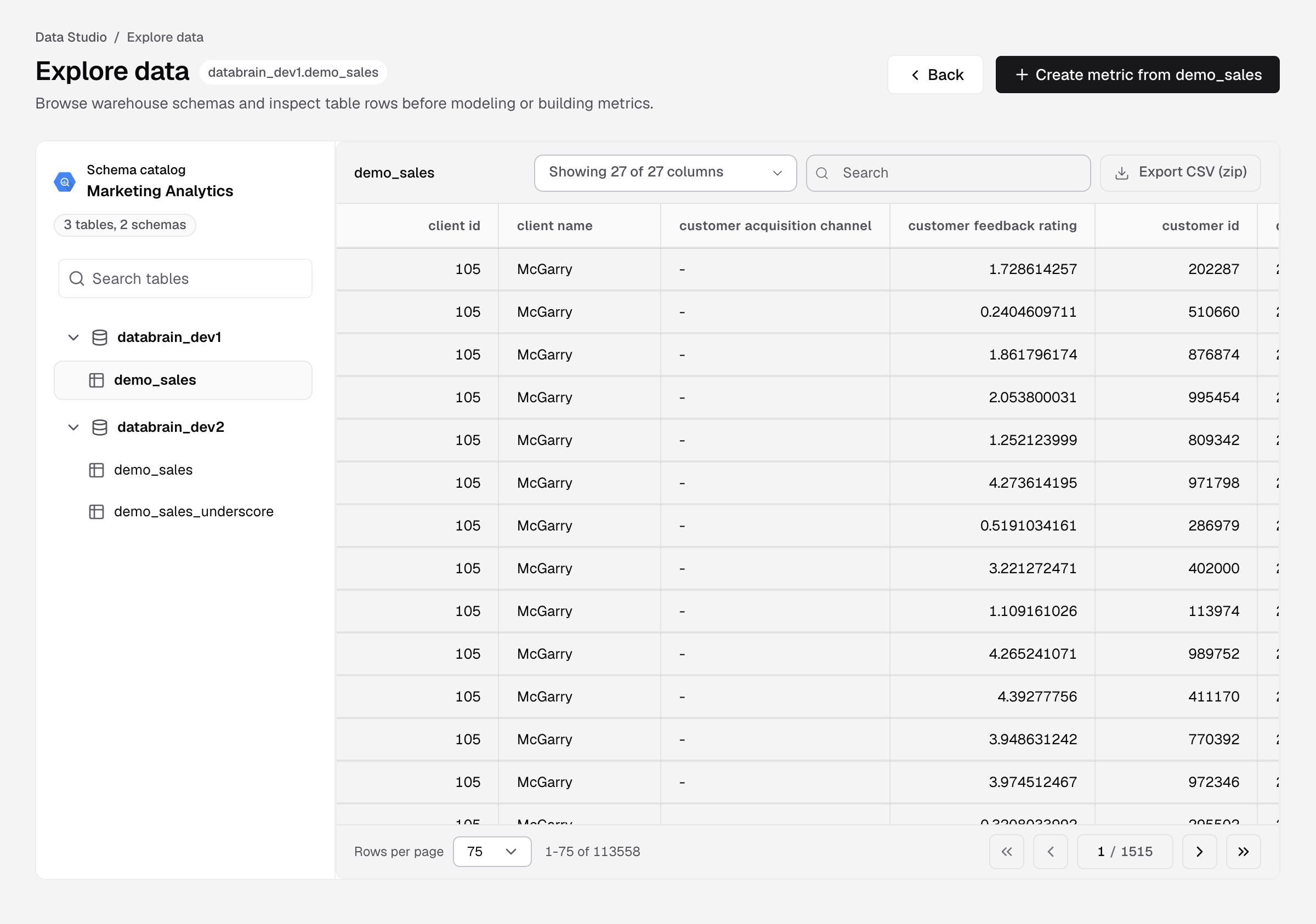
- Select Explore data in the workspace header.
- In Schema catalog, find the table. Type in Search tables to filter by schema or table name.
- Select the table.
You see its rows, 75 per page. Change Rows per page, choose columns in Showing ... columns, type in Search, or select Export CSV (zip) to download the rows. Databrain reads one page of rows at a time and never writes to your warehouse.
To build a metric from the table, select Create metric from the table name. The metric builder opens in a new tab.
In a multi-datasource or multi-datamart workspace, choose the Datasource or Datamart in the header. For database tenancy, choose a client in the header.
If something goes wrong
- No tables in your datasource. The connection returned no tables. Sync the datasource, then select Check again.
- Could not read the schema catalog. The connection may be down or its credentials expired. Select Try again, or Check the connection.
- No datasource connected. Connect a datasource to the workspace in workspace settings.