

Organization
Find an error with Diagnostics
Look up a support ref, read masked logs and the audit trail, check health, and get help.
Before you start
- You are an Admin.
- Your company is on the Enterprise plan. Trials include it.
Look up an error
Every error message in Databrain shows a support ref, for example Ref 3F9A2C.
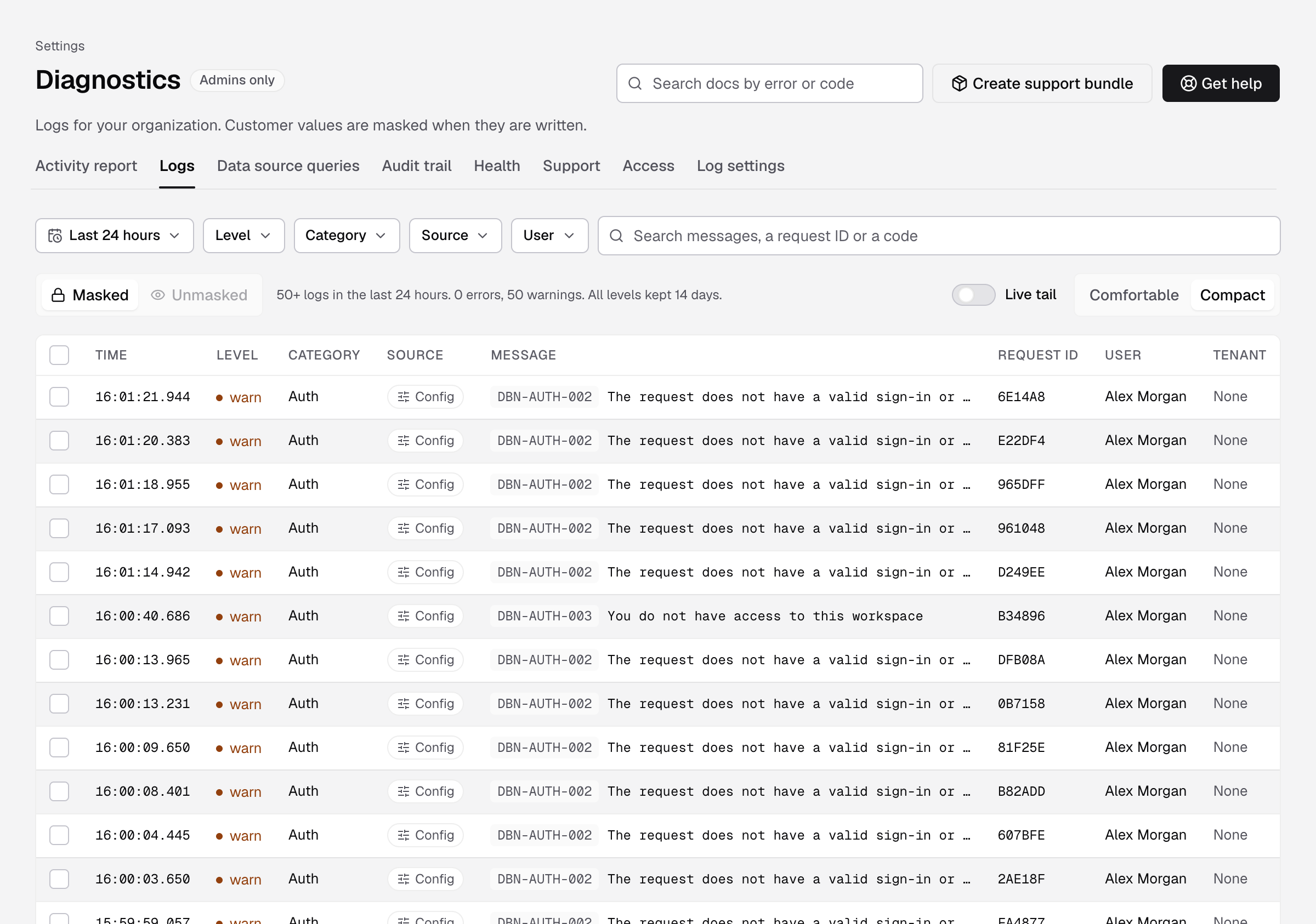
- In the error message, select View in Diagnostics. Or go to Settings > Diagnostics, select Logs, and type the ref in the search box.
- Select the log line.
You see what happened, when, for which user and tenant. Customer values are masked.
The error message also has Copy ref, and Ask for help to open a support ticket with the ref. People who are not Admins see only Copy ref. They can send the ref to an Admin.
Tabs
| Tab | What it shows |
|---|---|
| Activity report | How your team used Databrain, month by month. Select Export PDF or Export JSON. |
| Logs | Errors, warnings and info lines. Filter by Time range, Level, Category, Source, User and Tenant or client. |
| Data source queries | Queries sent to your warehouses. |
| Audit trail | Sign-ins, role changes, datasource edits, exports, API keys and support sessions. Select Export CSV or Export JSON. |
| Health | Checks of your warehouse, database, cache, reports and more. Select Run all checks. |
| Support | Your support tickets. |
| Access | Databrain support people you invited, and for how long. |
| Log settings | How long logs are kept and from which level. |
Get help
- Select Get help.
- Search the help pages for the error code first.
- If you still need help, enter a Subject, choose the Severity and describe What happened?.
- Keep Context data on Masked (recommended).
- Select Send ticket.
The ticket appears on the Support tab. To send logs, select Create support bundle.
Invite Databrain support
- Select the Access tab, then Invite Databrain support.
- Enter the support person’s name and
@usedatabrain.comemail, and the ticket. - Choose the Duration: 1, 4, 8 or 24 hours.
- Select Send invite.
Support can read Diagnostics only, with values masked. They cannot invite others, extend their own access, change roles or create API keys. Access ends when the time runs out, when you select End now, or when the ticket closes.
Keep logs
On Log settings, set Keep logs for 7, 14, 30 or 90 days, and Store from level. Old lines are removed every night. Audit entries keep their own retention and are never pruned.
If something goes wrong
- Diagnostics is included with your plan. Contact Databrain support to finish setting it up. Diagnostics is not on for your company yet. It needs the Enterprise plan.
- You need admin access to see Diagnostics. Ask an Admin.