

Organization
Check your plan usage
See how many AI credits are left, which models use the most tokens, and your other plan limits.
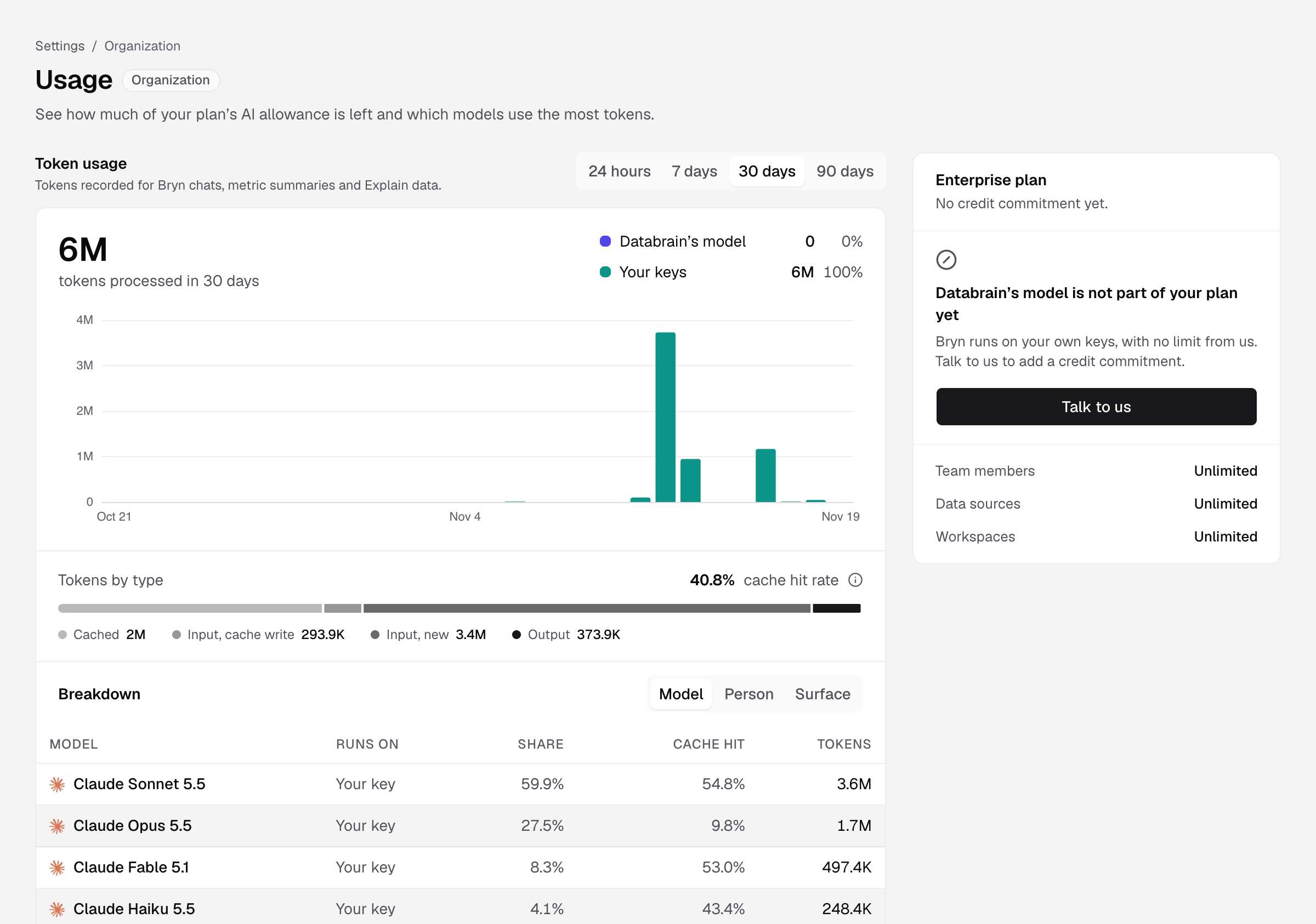
Everyone in your company can open this page. Only Admins see the breakdown by model, person and surface.
Steps
- Go to Settings > Usage.
- Under Token usage, choose 24 hours, 7 days, 30 days or 90 days.
You see the tokens processed for Bryn chats, metric summaries and Explain data, split into Databrain’s model and Your keys. Admins also see Tokens by type and a Breakdown by Model, Person or Surface.
Plan limits
The card on the right shows your plan’s credits:
- Credits this month: how many are left, and when they reset.
- A forecast, for example On track or Ahead of pace.
- Your other limits, when your plan has them: Team members, Data sources, Embeds, Scheduled reports and Workspaces, each as used of limit, or Unlimited.
One credit is one Bryn turn, on any model, your own key included. Failed or stopped answers are free. Credits are shared by everyone in your company.
When credits run out
- With your own model key, Bryn keeps answering on your key at no extra charge.
- Without one, you see Limit reached until the reset date. An Admin can add a key in Settings > LLMs, or change the plan.
On a self-hosted install there is no Databrain allowance. Token usage covers your own keys only.