

SQL and Python
Python guidelines
Rules for Python metrics: imports, filters, secrets and the result format.
Rules
- Assign a list of dictionaries to
result. Each dictionary is one row, and each key is one column. Use the same keys in every row. - Return JSON values only: strings, numbers, booleans and
None. Turn dates into strings. - You can import only
requests,datetimeandtyping. Other imports are removed before the code runs. exec,evalandopendo nothing.- Give every
requestscall atimeout, and handle a failed response.
Filter by client
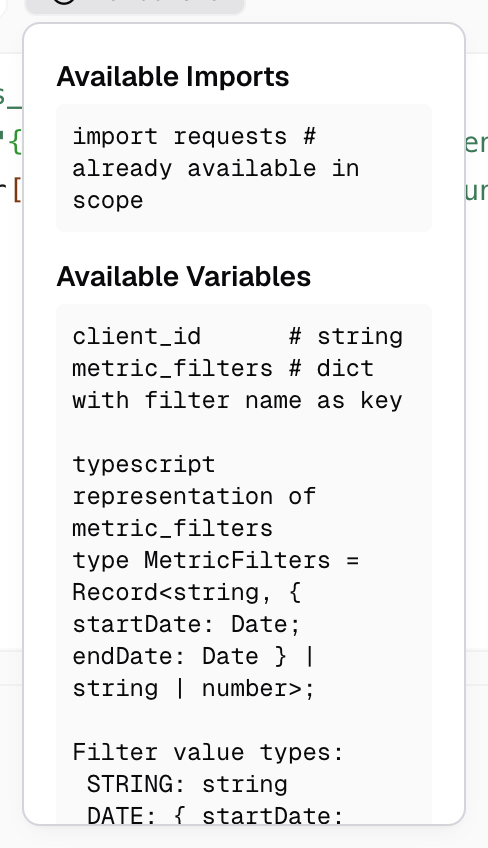
client_id is the viewer’s client ID. Your code must use it to fetch only that client’s rows. Databrain does not filter Python results for you.
Read filter values
metric_filters holds the metric’s Variable Filter values, keyed by filter name.
| Filter type | Value |
|---|---|
| Text | A string |
| Number | A number |
| Date | A dictionary with start_date and end_date |
region = metric_filters.get("region")
dates = metric_filters.get("order_date", {})
params = {"client": client_id, "region": region, "from": dates.get("start_date"), "to": dates.get("end_date")}
rows = requests.get(f"{secrets['secrets_BASE_URL']}/orders", params=params, timeout=10).json()
result = [{"day": r["day"], "orders": r["orders"]} for r in rows]
Use secrets
Read a secret by the name the Secrets page shows: a secret saved as BASE_URL is secrets['secrets_BASE_URL']. Never print a secret or put it in result. See Store secrets.
Caching
If the workspace has caching on, Databrain caches the result for the same code and client.